

Understanding Device Reachability and Deliverability
To document how Firebase Cloud Messaging (FCM) reachability and deliverability work, drawing from real-world analysis and official Firebase documentation.
Prerequisites
We recommend that you get yourself acquainted with all the concepts related to Users and Events before proceeding. Doing so will help you understand the workings of this section, better.
Users
Users represent individuals interacting with your app, identified either anonymously or via a unique ID. You can enrich user profiles with attributes to enable segmentation, personalization, and better understanding of user behavior. Read more on Users
Events
Events represent actions performed by users while interacting with your app, such as clicks, purchases, or others. They capture behavioral data along with attributes, helping you analyze user journeys and trigger targeted engagement. Read more on Events
Devices
Anybody interacted with your business at least once via Website or Mobile device has a unique device attached to them. A user can have multiple devices and each device has its own push reachability.
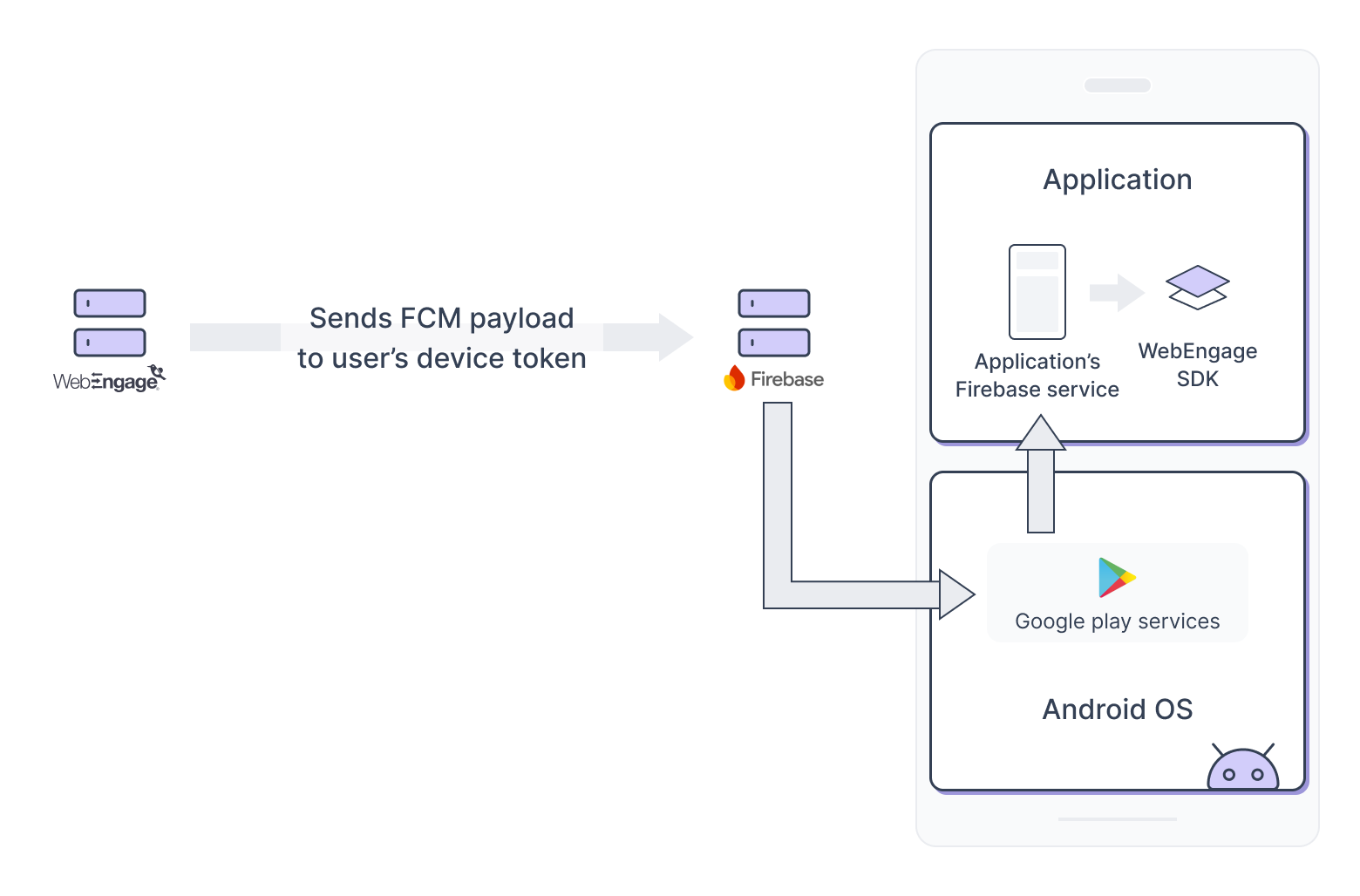
How WebEngage sends FCM to user's device?
The journey of a notification is an asynchronous chain. A "Success" response from the WebEngage API only confirms the start of this chain.
WebEngage Server: Validates the user segment and sends the payload to the Cloud Service Provider (CSP).
FCM: Accepts the message and checks if a persistent socket connection exists for that specific Device Token.
Transport Layer: If the device is "Offline" (no internet), the FCM stores the message in a TTL (Time-to-Live)buffer.
Android OS: Receives the packet via a background system process (Google Play Services).
SDK Layer: The WebEngage SDK intercepts the intent, downloads rich media (if any), and renders the notification.
Reachability
No FCM token available
About ~5% of devices show unreachable behaviour due to device-specific failures such as:
| Error | Meaning | Common Causes | Suggested Action |
|---|---|---|---|
| MISSING_INSTANCEID_SERVICE | Firebase SDK cannot access the Instance ID / Firebase Installations service from Google Play Services. | Google Play Services missing, disabled, outdated, or killed by OEM battery optimization. Also occurs on non-GMS devices. | Ensure Google Play Services is installed and updated. Ask users to disable aggressive battery optimization on affected OEM devices. Retry token generation. |
| SERVICE_NOT_AVAILABLE | Firebase could not reach the FCM backend services. | No internet connectivity, unstable network, firewall blocking Google endpoints, or temporary server issue. | Check network connectivity and retry. |
| TIMEOUT | The request to Firebase backend or Google Play Services took too long to complete. | Slow network, Play Services delay, device under heavy battery optimization, network switching. | Retry token generation. Ensure stable network connectivity. |
| AUTHENTICATION_FAILED | Firebase rejected the authentication request for the app installation. | Invalid Firebase configuration, incorrect API key, project mismatch, corrupted installation state. | Verify Firebase project configuration and API keys. Reinstall the app if needed. |
| PHONE_REGISTRATION_ERROR | Google Play Services failed to register the device with FCM infrastructure. | Play Services malfunction, outdated Play Services, network restrictions blocking Google services. | Update Google Play Services and retry token generation. |
| TOO_MANY_REGISTRATION | Too many FCM registration requests were made in a short period. | App repeatedly calling getToken(), installation ID being frequently reset, aggressive retry logic. | Avoid frequent token requests. Implement retry with backoff. |
| FIS_AUTH_ERROR | Authentication with Firebase Installations Service failed. | Invalid Firebase project configuration, expired installation auth token, temporary backend issue. | Retry after some time. Verify Firebase configuration. |
| Firebase Installations getId Task has timed out | Firebase Installation ID (FID) generation did not complete within the expected time. | Slow network, Play Services delay, aggressive battery optimization, background restrictions. | Retry operation and ensure stable network and Play Services availability. |
How to measure the impact?
Track an event FCMTokenError on WebEngage and analyze it in Event analytics to understand and assess the impact and frequency of similar events.
 FirebaseMessaging.getInstance().token
            .addOnCompleteListener { task ->
                try {
                    if (task.isSuccessful) {
                        val token = task.result
                        WebEngage.get().setRegistrationID(token)
                    } else {
                        val message = hashMapOf(
                            "error" to (task.exception?.message ?: "Unknown error")
                        )
                        WebEngage.get().analytics()
                            .track("FCMTokenError", message)
                    }
                } catch (e: Exception) {
                    e.printStackTrace()
                    val message = hashMapOf(
                        "error" to (e.message ?: "Unknown error")
                    )
                    WebEngage.get().analytics()
                        .track("FCMTokenError", message)
                }
            }
Missing Android 13 Notification Permission
Android 13 (API Level 33) and above introduced a runtime POST_NOTIFICATIONS permission required before notifications can be shown (and therefore before FCM notifications are fully usable). Your app must request and handle this permission at runtime. (Google official docs)
How to make your device reachable on WebEngage?
Follow the doc to make your application compatible with Android 13 and above and for tracking reachability on WebEngage.
Deliverability -What Affects Message Delivery
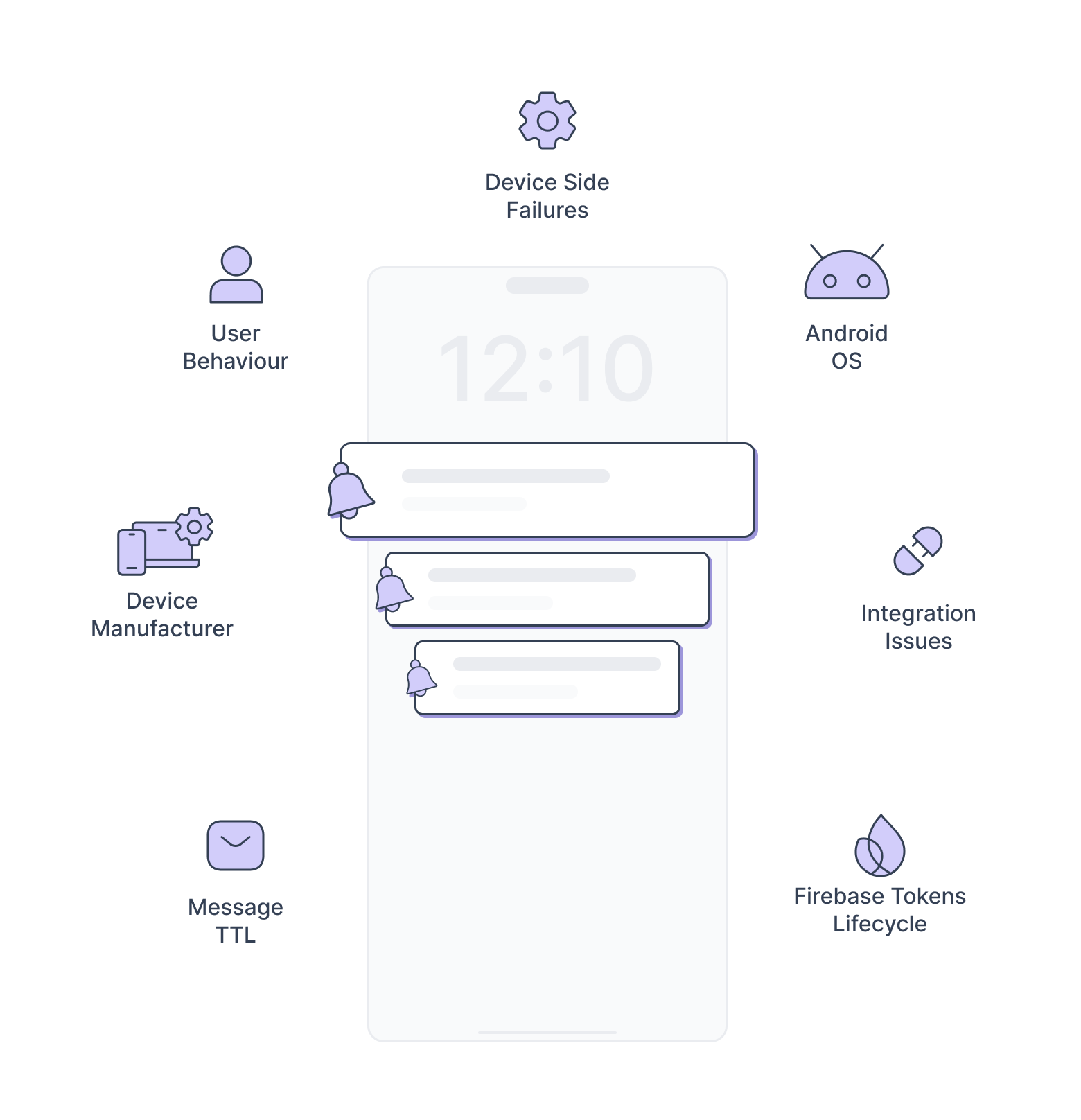
Deliverability depends on numerous factors:
Integration Issues
Permissions
Missing or incorrectly handled Android 13 notification permission can block all notifications (even if token is valid). Follow the doc to make your application compatible with Android 13 and above and for tracking reachability on WebEngage.
Token Handling
Not handling onNewToken() properly can cause send attempts to stale tokens.
Follow the doc to pass refreshed token to WebEngage
Official docs stress storing and managing tokens effectively: Best practices include storing tokens on your server and updating whenever token changes. (Firebase)
Handling multiple Firebase service
If multiple Firebase services are implemented; at any given time, only one Firebase service will receive the message callback onMessageReceived.
How to debug?
- In the merged manifest check for services having intent-filters
<intent-filter>
  <action android:name="com.google.firebase.MESSAGING_EVENT" />
</intent-filter>- If you discover several services, find a means to construct a common service that passes the message payload to WebEngage as mentioned here.
Android OS
Doze Mode: If the phone is stationary and the screen is off, Android enters Doze. Normal priority messages are queued. Only High priority messages can "poke" the device to wake up. High priority messages delivery can also be impacted and converted to a normal priority if user does not interact with the previously sent notifications. Read here to dive deeper.
Battery Saver Mode In power-saving modes, restrictions are more aggressive: Background Data Blocking: Most apps are prevented from accessing the network entirely. App Pausing: The OS may "pause" non-essential apps, which stops them from sending or receiving notifications until the user manually opens them. Execution Limits: Even if a high-priority message reaches the device, the OS might prevent the app's onMessageReceived() code from running immediately to save CPU cycles.
To tackle with these problems, WebEngage has implemented a solution (Push amplification) which amplifies the push delivery where FCM fails to deliver via FCM service.
User behaviour
The frequency with which the user opens/interacts with the application also influences the delivery of push notifications. User activity indirectly activates OS-level power-saving mechanisms, which block or delay FCM messages.
App Standby Buckets
App StandBy buckets were introduced in Android P as a part of battery saving feature. By default, the buckets are allocated based on their most recent usage. So the app which has not been used since long can fall in the rare bucket.
However, the buckets can also be allocated by OS using Machine Learning based on the user behaviour. The app is put in the bucket based on the possibility of its usage in the given time frame. This means that if the user uses the application every day from 3pm-9pm, and rarely uses the app at night, the app will be put in frequent standby bucket during 3pm-9pm and will be moved to rare bucket at night.
So when the device is in the rare bucket and in doze mode, the app needs FCM high priority message to wake the device and render the notification. However, if the limit defined by the OS for the high priority message is reached, any further high priority messages will be deprioritised to a normal priority and will not be able to wake the device for rendering the notification. These limits has changed from Android 13 and now controlled by OS. Read more here and here.
For example: This limit is set per day which means that if the app stays in the rare bucket, the app can only wake the device from doze mode for 5 times per day.
If the limit is reached and then the app is moved to any other bucket with lower restrictions, and then moved back to the rare bucket, the deprioritisation will continue happening. This means that event if the bucket changes any time during the day, as long as the bucket at the time of receiving the FCM is rare, the message will be deprioritised to normal priority. (Official google doc)
Live analysis of recency effect on Push delivery
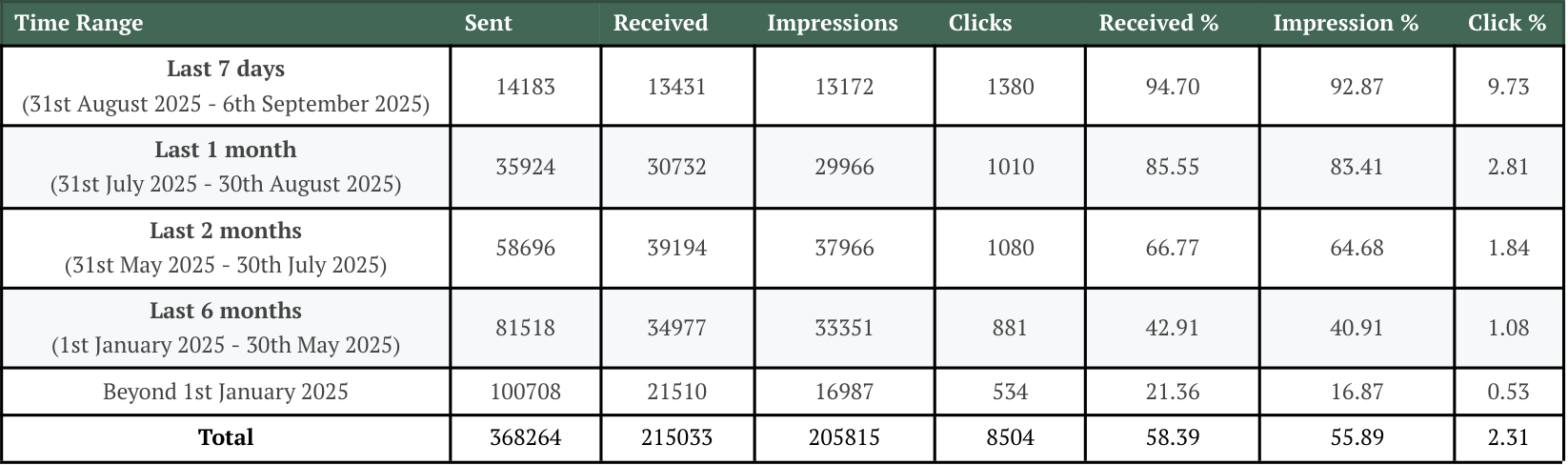
The following is an analysis of live data that highlights the influence of push delivery and impressions related to recent behaviour.
We plotted the push delivery and impressions against the App open in that time period. Let's understand from analogy: Push sent on 6th September has an delivery rate of ~95% for the users who were active in last 7 days and the percentage of delivery decreases with going beyond 7 days.
Device Manufacturer (OEM-Specific Aggressive Optimization)
Manufacturers like Samsung, Xiaomi (MIUI), and Huawei often implement custom battery optimizations that are stricter than standard Android.
Auto-start Blocks: These can prevent an app from waking up to process an FCM intent unless the user manually whitelists the app in settings.
More stricter App Stand By buckets logic: Every manufacturer can set their own criteria for how non-active apps are assigned to buckets.
Swiping the app away force-stops the application killing all the background services including FCM, resulting in no delivery. Only, opening application manually will result in push delivery.
FCM Registration Token Lifecycle & Expiry
FCM tokens (registration tokens) are how FCM uniquely identifies a device/app instance.
Token Validity
Tokens are long-lived but become stale if the device doesn’t connect to FCM for ~30 days. (Firebase)
After 270 days of inactivity, FCM marks tokens as expired/invalid and rejects send attempts. (Firebase)
Stale registration tokens are tokens associated with inactive devices that have not connected to FCM for over a month. As time passes, it becomes less and less likely for the device to ever connect to FCM again. Message sends and topic fanouts for these stale tokens are unlikely to ever be delivered.
This means:
After extended inactivity (≥ 270 days), a device is essentially no longer reachable with its old token.
Only when the user opens the app again and register token refreshes will it become reachable again.
Official guidance: “When stale tokens reach 270 days of inactivity, FCM considers them expired … once expired, FCM marks them as invalid and rejects sends.” (Firebase)
Message TTL
If TTL expires while the device is offline, the message is dropped by the FCM itself, resulting in failed delivery to the device.
For example:
If a user is on a flight for 12 hours:
If you set TTL = 2 hours, the message is deleted by FCM/APNs before the user lands.
If you set TTL = 24 hours, the message will "burst" onto the phone as soon as they turn off Airplane Mode.
Configure Queuing on WebEngage Dashboard to set TTL.

Understanding Push Failure Events
WebEngage provides two types of failure events to help diagnose push notification issues:
1. Push Failed (For Android Device-side only)
Even if the user's device is reachable and receiving push messages, push is not always shown or viewed. For such instances, Push Received will be called but not Push Notification View. This event is fired from the device.
It indicates that:
- The device successfully received the push notification
- But the notification could not be rendered or displayed
How should this be investigated on WebEngage Dashboard?
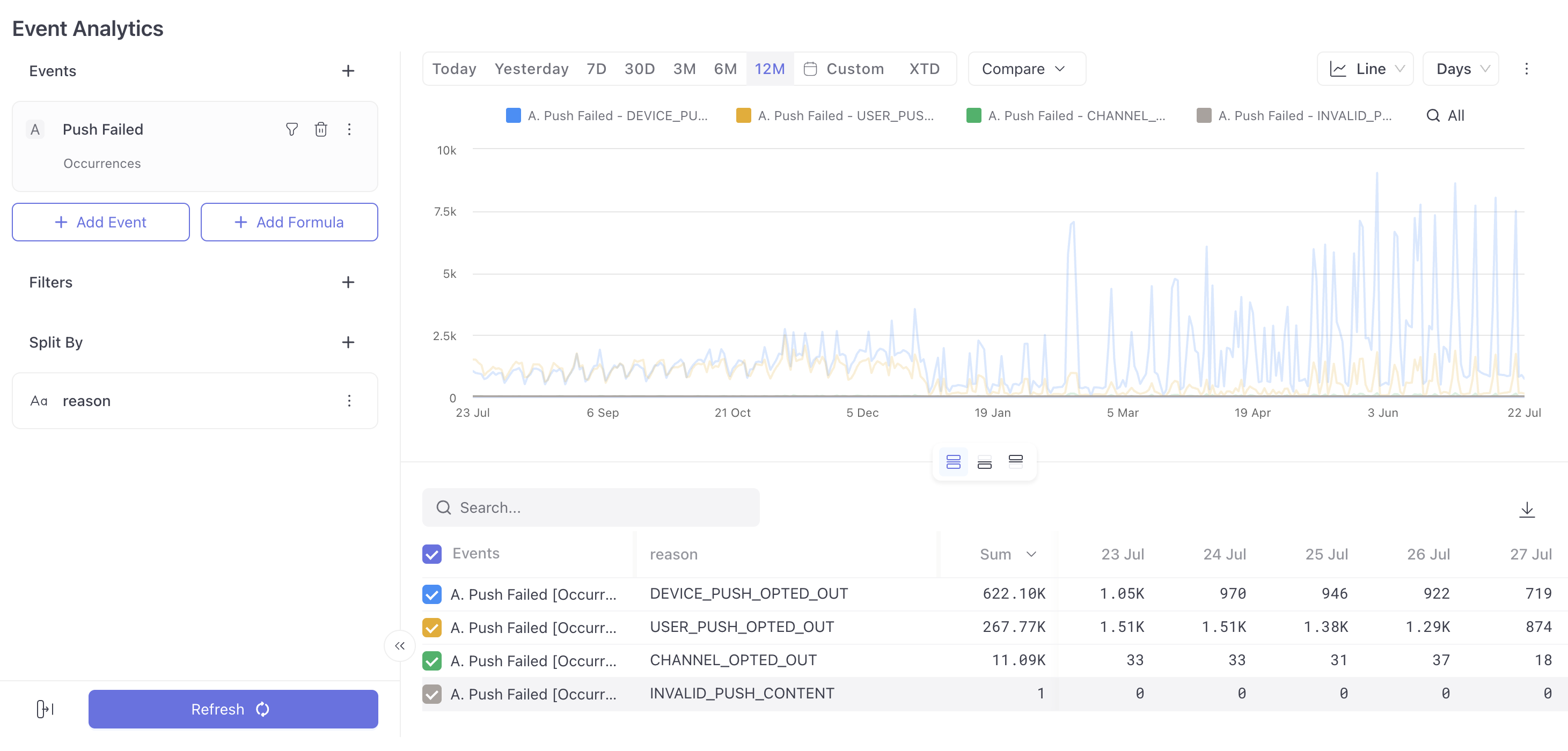
- Navigate to Event Analytics section
- Search for
Push Failedand split byreason
Push Failed Reasons
For such failures happened on the client (device) end, SDK tracks Push Failed event with below codes.
| Failure Code | Failure Reason | Description |
|---|---|---|
| Channel Opted Out | User opted out of push device channel | User has unsubscribed from the specific channel (e.g., "Marketing") |
| Unknown SDK Error | Unexpected SDK error | Technical issues during push processing/rendering. |
| Device Push Opted Out | Push disabled at device level | User turned off push permissions in device/app settings |
| User Push Opted Out | User Push Opted Out | User explicitly opted out through app interface |
| Timer Date Expired | Timer Date Expired | Timer-based push sent after the target date/time |
| Custom Push Render Failed | Custom push failed to render | Client-side custom rendering of notification failed |
| Invalid Push Content | Missing or invalid content | Required elements missing or corrupted |
Analyze the occurrences of the event 'Push Notification Failed' to determine the impact on the WebEngage dashboard. For example, to determine the impact of Channel Opted Out, split the occurrences with error_message=Channel Opted Out. See the image reference above.
Channel opt-outs are the most recorded reason for view failures reported across clients and may be smartly handled by introducing unique channels as per the doc.
Layout-Specific Failure Scenarios
These failures occur when push content doesn't meet the requirements for specific layout types:
Overlay Layout
| Configuration | Collapsed Image | Expanded Image | Text & Description | Push Renders? | Failure Reason |
|---|---|---|---|---|---|
| Standard | - | Invalid Image | Non-Empty | ✅ Yes | - |
| Expanded + No Collapsed | - | Invalid Image | Empty | ❌ No | Invalid Push Content |
| Expanded + No Collapsed | - | Valid Image | Non-Empty | ✅ Yes | - |
| Expanded + No Collapsed | - | Valid Image | Empty | ✅ Yes | - |
| Expanded + Collapsed Full | Invalid Image | Valid Image | Non-Empty | ✅ Yes | - |
| Expanded + Collapsed Full | Invalid Image | Valid Image | Empty | ❌ No | Invalid Push Content |
| Expanded + Collapsed Full | Valid Image | Valid Image | Non-Empty | ✅ Yes | - |
| Expanded + Collapsed Full | Valid Image | Valid Image | Empty | ✅ Yes | - |
| Expanded + Collapsed Full | Invalid Image | Invalid Image | Non-Empty | ✅ Yes | - |
| Expanded + Collapsed Full | Invalid Image | Invalid Image | Empty | ❌ No | Invalid Push Content |
| Expanded + Collapsed Half | Invalid Image | Valid Image | Non-Empty | ✅ Yes | - |
| Expanded + Collapsed Half | Invalid Image | Valid Image | Empty | ❌ No | Invalid Push Content |
| Expanded + Collapsed Half | Valid Image | Valid Image | Non-Empty | ✅ Yes | - |
| Expanded + Collapsed Half | Valid Image | Valid Image | Empty | ✅ Yes | - |
| Expanded + Collapsed Half | Invalid Image | Invalid Image | Non-Empty | ✅ Yes | - |
| Expanded + Collapsed Half | Invalid Image | Invalid Image | Empty | ❌ No | Invalid Push Content |
Banner Layout
| Image Status | Text & Description | Push Renders? | Failure Reason |
|---|---|---|---|
| Invalid Image | Empty | ❌ No | Invalid Push Content |
| Invalid Image | Non-Empty | ✅ Yes | - |
| Valid Image | Non-Empty | ✅ Yes | - |
| Valid Image | Empty | ✅ Yes | - |
Text Layout
| Text & Description | Push Renders? | Failure Reason |
|---|---|---|
| Empty | ❌ No | Invalid Push Content |
| Non-Empty | ✅ Yes | - |
Carousel Layout
| Image Configuration | Text & Description | Push Renders? | Failure Reason |
|---|---|---|---|
| All Invalid Images | Empty | ❌ No | Invalid Push Content |
| All Invalid Images | Non-Empty | ✅ Yes | - |
| All Valid Images | Non-Empty | ✅ Yes | - |
| All Valid Images | Empty | ✅ Yes | - |
| Mixed (Some Invalid) | Empty | ❌ No | Invalid Push Content |
| Mixed (Some Invalid) | Non-Empty | ✅ Yes | - |
Rating Layout
| Image Status | Text & Description | Additional Info | Push Renders? | Failure Reason |
|---|---|---|---|---|
| Invalid Image | Empty | Title & Desc Available | ❌ No | Invalid Push Content |
| Invalid Image | Non-Empty | Title & Desc Available | ✅ Yes | - |
| Valid Image | Non-Empty | Title & Desc Available | ✅ Yes | - |
| Valid Image | Empty | Title & Desc Available | ✅ Yes | - |
Tiles Layout
| Image Status | Push Renders? | Failure Reason |
|---|---|---|
| Invalid Image | ❌ No | Invalid Push Content |
| Valid Image | ✅ Yes | - |
Timer Layout
| Image Status | Text & Description | Push Renders? | Failure Reason |
|---|---|---|---|
| Invalid Image | Empty | ❌ No | Invalid Push Content |
| Invalid Image | Non-Empty | ✅ Yes | - |
| No Image | Empty | ❌ No | Invalid Push Content |
| No Image | Non-Empty | ✅ Yes | - |
| Valid Image | Non-Empty | ✅ Yes | - |
| Valid Image | Empty | ✅ Yes | - |
Timer-Based Campaign Behavior This campaign type is designed to display a countdown timer targeting a specific date and time (e.g., Amazon Prime Day Sale starts on 12th July at 12:00 AM).
Rendering Logic: ✅ Delivered on or before 12th July, 12:00 AM → Push notification will be rendered along with the countdown timer.
❌ Delivered after 12th July, 12:00 AM (e.g., 12th July, 1:00 AM) → Push notification will be discarded and not rendered.
❗ Push Failure Reason: Timer Date Expired
2. Push Sent to FCM / APNs (Mobile)
This event fires after WebEngage has dispatched the notification to FCM or APNs. The failure codes under this event are all provider-level rejections — meaning WebEngage did its job and handed the message off, but the push provider (FCM/APNs) returned an error. Essentially, the push left WebEngage but died at or after the delivery gateway.
How should the success and errors be investigated on WebEngage Dashboard?
- Navigate to Event Analytics section
- Search for
Push Sent to FCM / APNs (Mobile)and split byresult
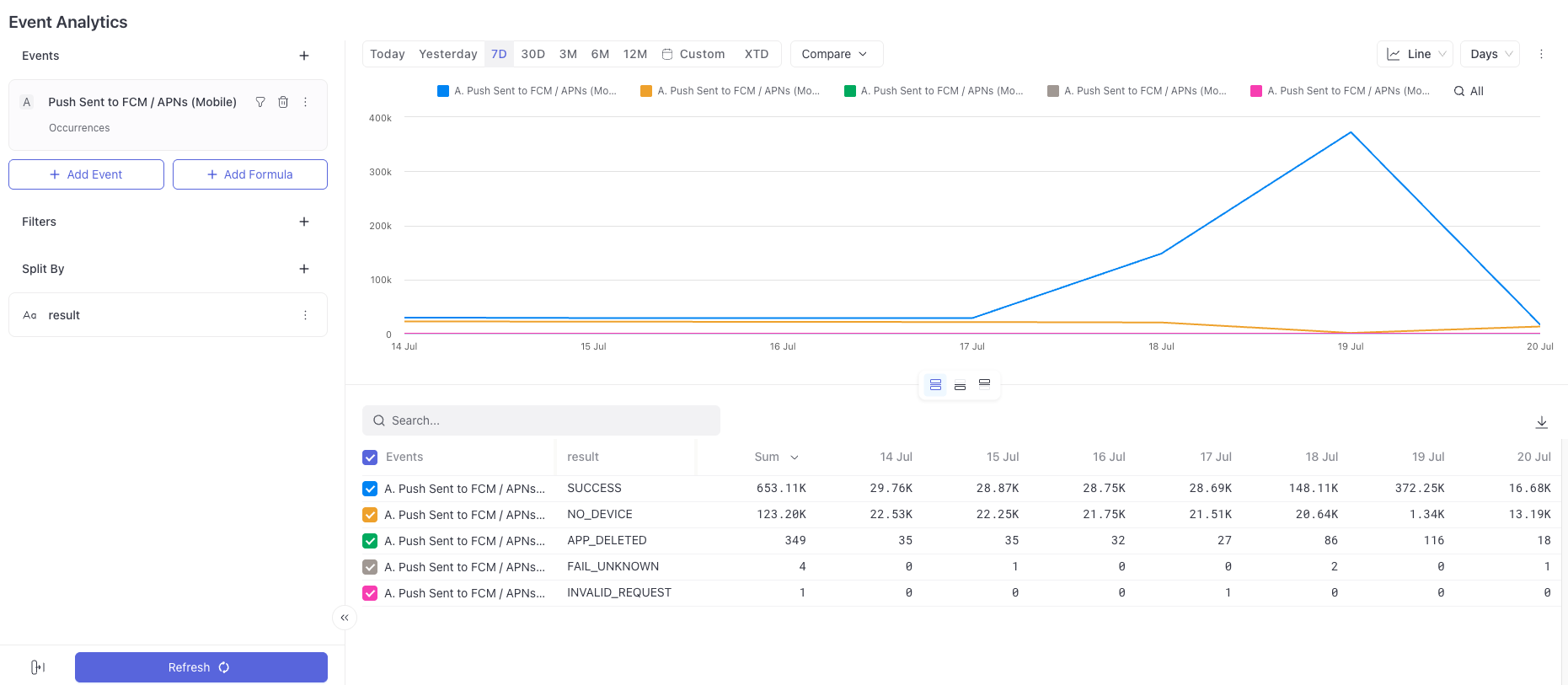
Push Failure Codes & Resolution
| Failure Code | Dashboard Reason | Description | How to Fix |
|---|---|---|---|
NO_DEVICE | Channel Not Available | Push delivery not possible | Ensure device token is generated and registered. Verify user is reachable on dashboard. |
APP_DELETED | Uninstalled | Application removed from device | User must reinstall the app. Token will be regenerated on fresh install. |
INVALID_REQUEST | Configuration Issue | Malformed request or configuration issue | Verify campaign configuration. Contact support if issue persists. |
INVALID_TOKEN | Invalid Push Token | Token is invalid or expired | Regenerate FCM token and re-register with WebEngage. |
AUTH_FAILURE | Configuration Issue | FCM/APNs credentials invalid | Re-upload valid push credentials in dashboard. |
APP_ID_MISMATCH | Configuration Issue | App not configured correctly | Verify correct App ID and project mapping. |
UNAVAILABLE | Device Not Registered | Push provider (FCM/APNs) unavailable | Retry after some time. Ensure device is registered properly. |
MESSAGE_TOO_BIG | Too big message to send | Notification exceeds size limits | Reduce payload size and custom data. |
TEMPLATE_ERROR | Personalization Error | Template rendering failed | Validate personalization variables. |
INCOMPATIBLE_LAYOUT | SDK Incompatible With Campaign Layout | Layout not supported by SDK | Upgrade SDK or change layout. |
DEVICE_OPT_OUT | Device Opted Out | Device opted out of push | Ensure push permission is enabled. |
USER_OPT_OUT | User Opted Out | User unsubscribed from push as a channel | Re-subscribe user if applicable. |
QUOTA_EXCEEDED | Rate limit exceeded | FCM quota exceeded | Reduce sending frequency or check quota limits. |
FAIL_UNKNOWN | Failure reason is unknown | Invalid push credentials or unknown FCM error | Verify Firebase credentials uploaded in dashboard. Check FCM configuration. |
3. Push Failed - Rejected by FCM, Queue Drop etc. (Mobile & Web)
This event fires before the notification ever reaches FCM or APNs. The failure codes here are all WebEngage-side drops — the platform evaluated its own rules and decided not to dispatch the message at all. The reasons are things like frequency caps (daily/weekly/monthly limits), engagement gap rules, DND windows, and elapsed timezone schedules. The push was suppressed internally and never handed off to the provider.
How should the success and errors be investigated on WebEngage Dashboard?
- Navigate to Event Analytics section
- Search for
Push Failed - Rejected by FCM, Queue Drop etc. (Mobile & Web)and split byreason
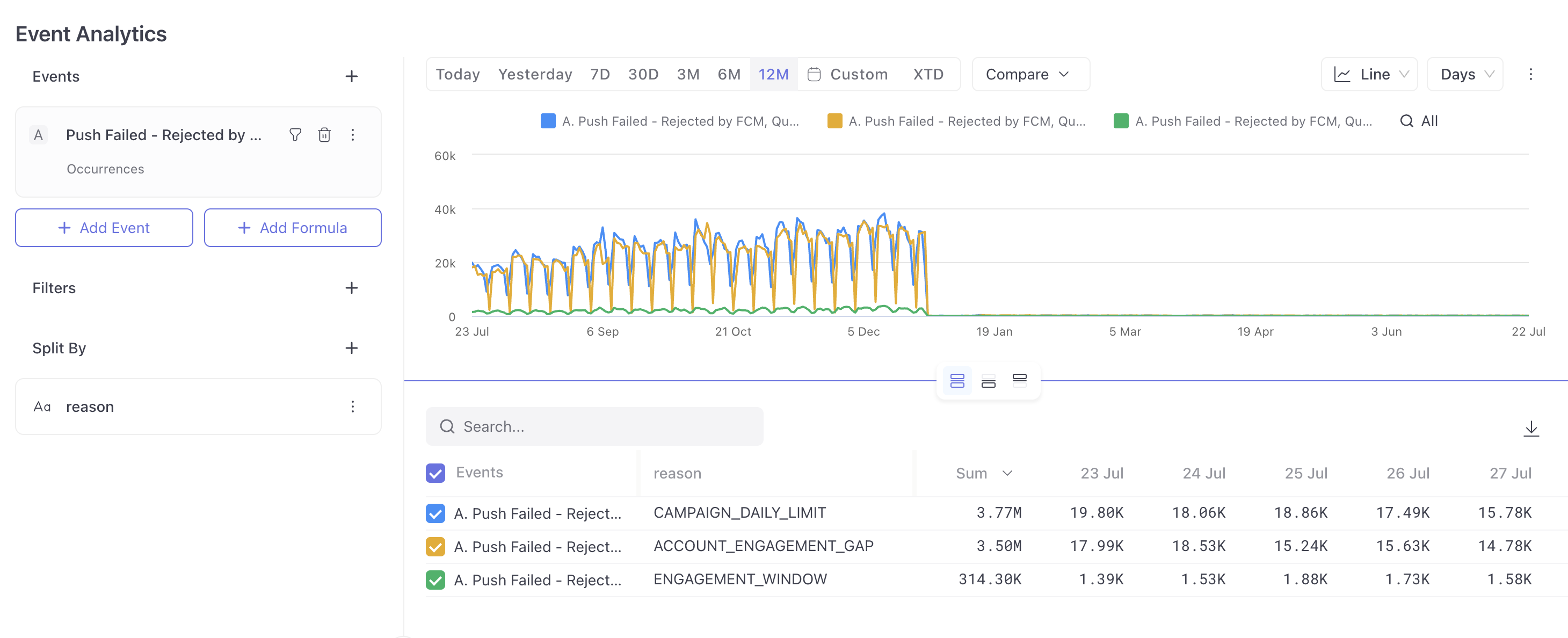
Push Failure Codes & Resolution
| Failure Code | Dashboard Reason | Description | How to Fix |
|---|---|---|---|
ACCOUNT_DAILY_LIMIT | Frequency Capping Queue Drop | Account daily limit reached | Adjust account-level frequency caps. |
ACCOUNT_WEEKLY_LIMIT | Frequency Capping Queue Drop | Account weekly limit reached | Adjust frequency settings. |
ACCOUNT_MONTHLY_LIMIT | Frequency Capping Queue Drop | Account monthly limit reached | Adjust frequency settings. |
ACCOUNT_ENGAGEMENT_GAP | Frequency Capping Queue Drop | Engagement gap rule applied | Review engagement rules. |
CAMPAIGN_DAILY_LIMIT | Frequency Capping Queue Drop | Campaign daily limit reached | Adjust campaign limits. |
CAMPAIGN_WEEKLY_LIMIT | Frequency Capping Queue Drop | Campaign weekly limit reached | Adjust campaign limits. |
CAMPAIGN_MONTHLY_LIMIT | Frequency Capping Queue Drop | Campaign monthly limit reached | Adjust campaign limits. |
CAMPAIGN_ENGAGEMENT_GAP | Frequency Capping Queue Drop | Campaign engagement restriction | Review campaign rules. |
ENGAGEMENT_WINDOW | DND Queue Drop | Outside engagement window | Adjust DND / send time settings. |
TIME_ZONE_ELAPSED | Time Zone Elapsed | Scheduled time missed | Adjust scheduling settings. |
Key Difference
| Event | Fired From | Meaning |
|---|---|---|
| Push Notification Failed | Device | Push delivered but not rendered |
| Push Sent to FCM / APNs (Mobile) | Server | Push not delivered to device |
| Push Failed - Rejected by FCM, Queue Drop etc. (Mobile & Web) | Server | Push not delivered to device |
Updated 3 months ago